Troubleshooting & Tools
Modded PC RAM & VRAM Allocator Calculator (JVM Args & Texture Cap Guide)
Short answer
More allocated RAM is NOT always faster in modded PC games. In Minecraft Java Edition, allocating 4–8 GB (while keeping at least 4 GB free for your OS and off-heap OpenGL buffers) prevents both OS swap stutter and Java Garbage Collection freeze spikes. In Skyrim, GPU VRAM dictates whether textures should be capped at 1K, 2K, or 4K.
Modded PC RAM & VRAM Allocator Calculator
Calculate safe memory allocation, texture resolution ceilings, and copy-ready JVM arguments (for Minecraft) or texture/VRAM budgets (for Skyrim SE/AE) based on your actual hardware.
How the Calculator Models Real Modded Memory Limits
Most online guides throw out a single generic number like “give Minecraft 8 GB” without accounting for your total system RAM, off-heap graphics memory, or GPU VRAM. That one-size-fits-all advice is why 8 GB and 16 GB laptops frequently stutter worse after players raise the RAM slider.
1. Minecraft’s Two-Pool RAM Reality (Heap vs. Off-Heap)
Minecraft Java Edition actually consumes two distinct chunks of system RAM simultaneously:
- JVM Heap (
-Xmx): Holds loaded chunks, blockstate tables, entity logic, and mod registries. - Off-Heap Native Memory: Used outside the JVM by LWJGL, OpenGL/Sodium vertex buffers, shader pipelines, and OpenAL audio—routinely adding 1.5 GB to 3 GB on top of whatever
-Xmxnumber you enter.
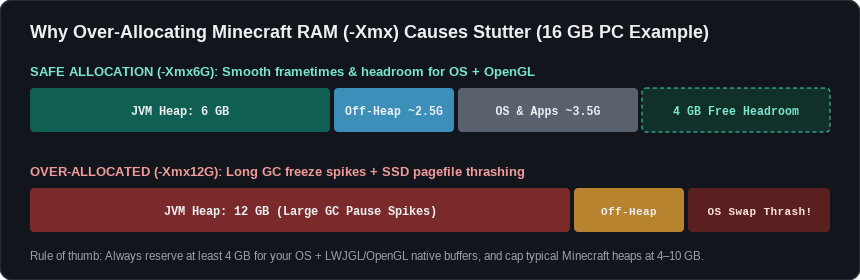
On a 16 GB PC, setting -Xmx12G pushes total demand (12 GB Heap + ~2.5 GB Off-Heap + ~3.5 GB OS = 18 GB) over physical RAM—forcing constant SSD paging stutters. Our calculator automatically protects OS + off-heap headroom first and keeps heap sizes inside the clean GC sweet spot (4 GB for light/Vanilla+, 6 GB for mid packs, 8–10 GB for heavy kitchen-sink packs).
2. What Each Generated Java 21+ G1GC Flag Actually Does
Never paste ancient 2016 Java 8 arguments (such as -XX:+CMSIncrementalMode or -XX:+UseConcMarkSweepGC) into modern Minecraft 26.x or 1.21.x—Java 21 removed those flags and will immediately fail with Exit Code 1. Every flag generated above is verified for Java 21+:
| JVM Flag | Technical Purpose |
|---|---|
-Xms / -Xmx |
Sets starting heap size and hard maximum heap ceiling |
-XX:+UseG1GC |
Selects the Garbage-First collector built for low-latency pauses |
-XX:MaxGCPauseMillis=100 |
Guides G1GC to target shorter collection pauses so frames stay smooth |
-XX:+ParallelRefProcEnabled |
Processes object references across multiple CPU threads during GC |
-XX:G1NewSizePercent=30 / Max=40 |
Gives short-lived Minecraft chunk/tick objects enough young-gen room before promotion |
-XX:G1HeapRegionSize=16M |
Prevents larger Minecraft chunk arrays from triggering fragmented “humongous” allocations |
-XX:G1ReservePercent=15 |
Reserves breathing room to reduce emergency full-heap evacuation stalls |
(Tip: Always pair clean JVM flags with FerriteCore to cut raw blockstate memory usage by 30–45% before raising -Xmx.)
3. Skyrim VRAM Math: Why 4K Clutter Kills 8 GB GPUs
Texture memory scales with area (width × height), meaning every resolution step costs 4× more VRAM:
| Texture Tier | Pixel Dimensions | Relative VRAM Cost | Where to Use It |
|---|---|---|---|
| 1K | 1024 × 1024 |
1× (Baseline) |
Small clutter (apples, potions, forks, books), distant props, 4–6 GB GPUs & Steam Deck |
| 2K | 2048 × 2048 |
4× |
Landscapes, architecture, armor, weapons, NPCs on 8–12 GB GPUs |
| 4K | 4096 × 4096 |
16× |
Only giant hero surfaces (mountains, dragons, night sky) on 12–16 GB+ GPUs |
Installing a “4K Everything” clutter overhaul on an 8 GB GPU fills VRAM almost immediately—once VRAM overflows across the PCIe bus into system RAM, your GPU utilization collapses and frametimes spike into single-digit slideshows even on fast CPUs.
4. Setting a Safe Windows SSD Pagefile for Modded Skyrim
If you run 100+ Skyrim mods on a 16 GB PC and hit silent crash-to-desktops without a crash log:
- Open Windows Settings → System → About → Advanced system settings → Performance Settings → Advanced → Virtual Memory → Change.
- Uncheck Automatically manage paging file size, select your fast NVMe SSD, choose Custom size, and set Initial/Maximum size to
20480–32768 MB(20–32 GB). - Click Set → OK and restart Windows.
Official download sources
We never re-host mod files. Download only from the creators' official pages:
Frequently Asked Questions
Why shouldn't I allocate 16 GB of RAM to Minecraft if my PC has 32 GB?
Java's garbage collector allows temporary objects to pile up until heap thresholds fill. On an oversized 16 GB heap, cleaning massive memory pools causes noticeably longer stop-the-world pauses—appearing as rhythmic 0.5-second freeze frames while exploring. Unless a massive 400-mod pack provably stays above 80% live heap usage, 6–10 GB runs smoother.
Why does heavily modded Skyrim need a large SSD Pagefile even on 16 GB or 32 GB of RAM?
Modded Skyrim commits large virtual memory allocations during rapid cell transitions, shader compilation, and high-res asset loading. When Windows runs out of committed virtual memory (physical RAM + Pagefile), Skyrim crashes silently to desktop without writing a Crash Logger file.
Can I use Generational ZGC instead of G1GC on Java 21+?
Yes—on Java 21+ with 6–10 GB allocated and a modern 6+ core CPU, '-XX:+UseZGC -XX:+ZGenerational' often delivers near-zero pause times at the cost of slightly higher continuous CPU usage. G1GC remains the safest universal default across both laptops and desktops.