Troubleshooting & Tools
The 50/50 Binary Search Method: Finding a Broken Mod Out of 200+ in Under 10 Minutes
Short answer
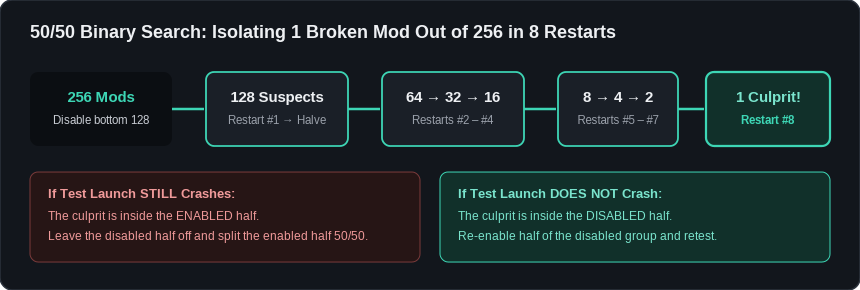
Never disable mods one by one—checking 256 mods linearly takes up to 256 restarts. Using 50/50 binary search halves your suspect pool on every launch, pinpointing any single broken mod out of 256 in exactly 8 restarts (and out of 1,024 in 10).
Why Linear Troubleshooting Wastes Hours
When a crash report blames only vanilla SkyrimSE.exe or net.minecraft.* without pointing to a single .esp or .jar, testing mods one by one is mathematically brutal. By contrast, 50/50 binary search cuts the remaining suspects in half on every single restart (O(log₂ n)):
| Total Suspect Mods | Worst-Case Launches (One by One) | Maximum Launches (50/50 Binary Search) |
|---|---|---|
| 16 mods | 16 restarts | 4 restarts |
| 32 mods | 32 restarts | 5 restarts |
| 64 mods | 64 restarts | 6 restarts |
| 128 mods | 128 restarts | 7 restarts |
| 256 mods | 256 restarts | 8 restarts |
| 512 mods | 512 restarts | 9 restarts |
| 1,024 mods | 1,024 restarts | 10 restarts |
Step 0: Four Preparation Rules That Prevent False Crashes
Binary search fails if you accidentally trigger brand-new crashes (like missing masters) halfway through testing. Complete these four prep steps first:
- Confirm a Fast, Repeatable Crash Trigger: Identify the shortest path to reproduce the crash—for example “crashes on launch”, “crashes 5 seconds after typing
coc whiterunin Skyrim”, or “crashes opening the Creative inventory in Minecraft”. - Snapshot Your Exact Working Order:
- Mod Organizer 2: Click the Create Backup icon above both the Left Pane and Right Pane, or clone your profile under Configure Profiles.
- Prism Launcher: Right-click the instance → Copy and run all testing inside the copy.
- Lock Core Libraries & Frameworks Always ON: Keep foundational dependencies checked throughout every round so disabling a group doesn’t throw fake
MissingModsException/ missing-master errors:- Minecraft: Keep
Fabric API,Cloth Config,Architectury,GeckoLib, andSodiumlocked ON (unless you specifically suspect a rendering/Sodium crash). - Skyrim: Keep
SKSE64 Scripts,Address Library,SSE Engine Fixes,Crash Logger,USSEP, andSkyUIlocked ON.
- Minecraft: Keep
- Temporarily Disable Generated Patch Outputs: In Skyrim, disable merged outputs (
Bashed Patch,Synthesis,DynDOLOD) during testing because they list dozens of mods as required masters and will refuse to load the moment you uncheck half your list.
Step-by-Step 50/50 Halving Walkthrough
Assume you have 160 suspect mods remaining after locking your core libraries:
- Split 50/50: Uncheck the bottom half (mods
#81through#160). Keep mods#1through#80enabled. - Launch & Trigger: Boot the game and perform the exact action that causes the crash.
- Outcome A — It STILL Crashes: The broken mod lives inside
#1–#80. Leave#81–#160unchecked, then uncheck#41–#80so only#1–#40remain active, and test again. - Outcome B — It DOES NOT Crash: The broken mod lives inside
#81–#160. Uncheck#1–#80(or keep them checked if needed as dependencies), check#81–#120, and test again.
- Outcome A — It STILL Crashes: The broken mod lives inside
- Keep Halving Until One Mod Remains:
160 → 80 → 40 → 20 → 10 → 5 → 2 → 1. Write down the active range on a notepad after each launch so you never lose track of which block you just cleared. - Run the Proof-of-Guilt Verification: Re-enable all 159 other mods while leaving that 1 identified suspect unchecked, and test your crash trigger again. If the game stays rock-solid, you have 100% proof.
Solving the Trickiest Edge Case: Two-Mod Conflicts
Sometimes a crash only happens when Mod X (sitting in the top half) and Mod Y (sitting in the bottom half) are loaded together—neither mod crashes on its own.
You will recognize a two-mod conflict immediately when both halves pass cleanly on their own:
- Top Half ON + Bottom Half OFF → No Crash
- Top Half OFF + Bottom Half ON → No Crash
- Top Half ON + Bottom Half ON → Crashes
How to isolate both halves of the conflicting pair cleanly:
Phase 1 (Find Mod Y in Bottom Half):
  - Lock ALL of Top Half ON.
  - Run 50/50 binary search across Bottom Half ONLY.
  - Because Top Half (containing Mod X) stays active, the crash triggers
    whenever Mod Y is included — isolating Mod Y in <= 7 restarts.

Phase 2 (Find Mod X in Top Half):
  - Disable all of Bottom Half EXCEPT Mod Y (lock Mod Y ON).
  - Run 50/50 binary search across Top Half ONLY.
  - Isolates Mod X in <= 7 restarts.
Once you have both names (Mod X + Mod Y), search Nexus Mods or Modrinth for an official compatibility patch, check whether changing their relative load order resolves the clash, or drop whichever mod matters less to your playthrough.
What If the Crash Is Random / Takes 30 Minutes to Trigger?
Binary search requires a reproducible trigger. For rare random crashes after 30+ minutes of play:
- Do not guess with 50/50 splits first—check VRAM / Pagefile limits via our RAM & VRAM Allocator and analyze two or three consecutive logs via our Skyrim Crash Logger Guide or Minecraft Crash Log Guide to find repeating patterns before disabling mods.
Official download sources
We never re-host mod files. Download only from the creators' official pages:
Frequently Asked Questions
What if the crash only happens when TWO specific mods are enabled at the same time?
If disabling Half A fixes the crash AND disabling Half B ALSO fixes the crash, you have a two-mod conflict (one mod in Half A clashing with one mod in Half B). Keep Half A fully ON while binary-searching Half B to find Mod #2, then lock Mod #2 ON while binary-searching Half A to find Mod #1.
Should I ever run 50/50 binary search on my main playthrough save?
No. Always test on a cloned profile or a throwaway new world/save (such as Skyrim's coc riverwood console command or a fresh Creative Minecraft world). Disabling content mods on your main save risks stripping items or baking unattached scripts into your save.
What if disabling ALL mods except core frameworks still crashes?
Then the problem is outside your mod list—check root-folder leftovers (old ENB d3d11.dll, mismatched SKSE64 or Engine Fixes Part 2 DLLs), corrupted game files (Verify Integrity in Steam), wrong Java runtime, or GPU driver crashes.