Modding Foundations & Safety
How Mod Load Order Works (Dependencies, Overrides, and Conflict Resolution)
Short answer
In almost every moddable PC game, 'last wins': whatever loads lower in the order overrides conflicting records or assets from mods loaded higher up. Separating loose asset priority (textures, meshes, scripts) from plugin/data order (ESP/ESM records) eliminates 90% of load-order bugs.
The Universal Rule: “Last Wins” (and the One Big UI Exception)
Whenever two mods edit the exact same game asset or database record—for example, Mod A changes Iron Sword damage to 12 and Mod B changes Iron Sword damage to 15—the game engine does not merge or average those values. It loads mods sequentially in order, meaning whichever mod loads last completely overwrites conflicting fields from earlier mods.
Knowing which visual direction means “last” prevents endless confusion:
- Skyrim, Fallout, Starfield (MO2 Left & Right Panes,
plugins.txt): Bottom of the list wins. Slot00(Skyrim.esm) loads first; slotFE/ bottom entries load last and take final priority. - Minecraft Resource Packs & Data Packs UI: Top of the selected list wins. Minecraft’s UI displays the highest-priority override at the top (applying packs bottom-up behind the scenes).
The Two Separate Layers of Load Order Most Players Confuse
The single biggest breakthrough in PC modding is realizing that Asset Priority and Plugin Record Order are two independent layers that can disagree with each other:
| Layer | File Types Controlled | Where Controlled (MO2) | Typical Symptoms When Misordered |
|---|---|---|---|
| 1. Loose Asset Priority | .dds textures, .nif meshes, .pex scripts, .swf UI files, .wav/.fuz audio |
Left Pane (Mod Priority numbers) | Wrong textures win, missing meshes, old script overwrites a newer fix, dark NPC faces |
| 2. Plugin / Record Order | .esm / .esp / .esl database entries (item stats, NPC records, cell edits, loot lists) |
Right Pane (plugins.txt / LOOT) |
Missing leveled-list loot, floating doors, reverted balance tweaks, CTD on entering a cell |
Real-World Conflict Example (The Skyrim Dark-Face Bug): Suppose NPC Overhaul A and AI Overhaul B both modify Lydia’s NPC record. If NPC Overhaul A wins in the Left Pane (supplying custom FaceGen
.nif/.ddsfiles), while AI Overhaul B wins in the Right Pane (supplying vanilla head-part references), the mesh and record stop matching—producing the infamous dark/shimmery NPC face glitch. Making the exact same winner (or a merged compatibility patch) sit lower in both panes fixes it instantly.
The Standard 6-Tier Load Order Skeleton
Whether you are building a 40-mod Vanilla+ Skyrim list or organizing a 200-mod overhaul, grouping your mods into six clean tiers keeps conflicts predictable and auditable:
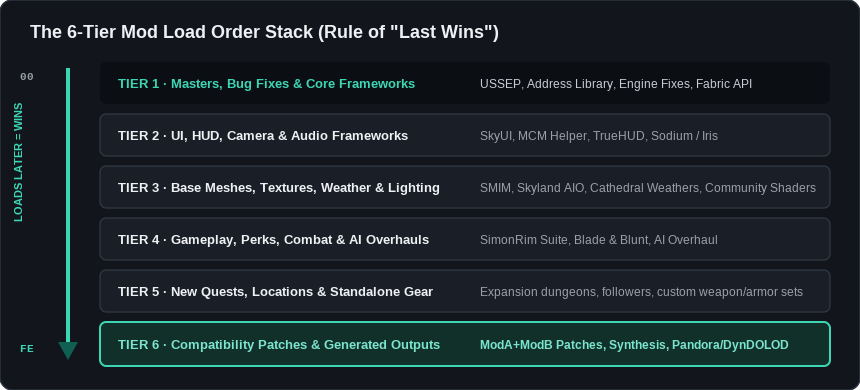
Breaking Down Each Tier
- Tier 1 — Masters, Unofficial Bug Fixes & Core Frameworks: Engine patches (
USSEP,Address Library,SSE Engine Fixes,Fabric API, shared library mods). Everything else expects these records to exist first. - Tier 2 — UI, HUD, Camera & Audio Frameworks: Interface overhauls (
SkyUI,MCM Helper,TrueHUD,Sodium,Iris). Placing UI cleanly near the top prevents HUD patches from getting buried. - Tier 3 — Base Meshes, Textures, Weather & Lighting: Broad visual baselines first (
SMIM→Skyland AIO→ targeted 2K hero retextures), followed by weather and lighting systems. Within Tier 3, always place broad packs higher and small specific retextures lower so small high-detail upgrades override broad baselines instead of getting buried by them. - Tier 4 — Gameplay, Perks, Combat & AI Overhauls: Cohesive balance suites (
SimonRim, combat pacing, encounter zones, NPC AI). Stick to one overhaul per gameplay system whenever possible. - Tier 5 — New Quests, Locations, Followers & Standalone Gear: Additive content mods that introduce new worldspaces, dungeons, or standalone armor/weapon sets.
- Tier 6 — Compatibility Patches & Generated Outputs: Every
ModA_ModB_Patch.esp, merged leveled-list patches (Wrye Bash/Synthesis), animation outputs (Pandora/Nemesis), and distant terrain LOD (DynDOLOD). These always load last so their conflict resolutions win.
How Compatibility Patches Actually Work
When Mod A edits Whiterun’s market stalls and Mod B re-lights Whiterun’s interiors and street lanterns, simply dragging B below A does not combine them—it erases Mod A’s edits to any shared cell record, leaving lanterns floating in mid-air or doors clipped into walls.
A compatibility patch (ModA_ModB_Patch.esp) lists both Mod A and Mod B as required masters and explicitly carries forward Mod A’s layout alongside Mod B’s lighting coordinates into one winning record.
Checking Conflicts Yourself in SSEEdit (5-Minute Skill)
You don’t need to be a programmer to spot silent overwrites in Bethesda games:
- Launch SSEEdit through Mod Organizer 2 and load your active plugins.
- Right-click the left tree → Apply Filter to Show Conflicts.
- Expand any red-highlighted record: columns run left-to-right in load order, so the rightmost column is the exact value the game will use. If an older mod’s patch or a lighting mod is accidentally reverting a bug fix from USSEP, you see it in seconds.
Practical Rules That Keep Load Orders Stable Long-Term
- Use MO2 Separators: Right-click in MO2’s Left Pane → All Mods → Create Separator for each of the 6 tiers so you can collapse and audit sections visually.
- Install in Small Verified Batches: Add 5–10 mods from one tier, sort, and test-boot before jumping to the next tier.
- Never Mix Competing Overhauls for the Same System: Two weather mods, two perk overhauls, or two lighting systems will fight endlessly unless an explicit patch bridges them.
- Verify Before Launch: Walk through our Interactive Mod Pre-Launch & Load Order Safety Checklist before committing a new load order to your main save.
Official download sources
We never re-host mod files. Download only from the creators' official pages:
Frequently Asked Questions
Does LOOT automatically fix every load order conflict?
No. LOOT is a strong starting baseline that enforces master dependencies and community metadata rules, but it cannot know your personal visual preferences and does not sort loose file priority in Mod Organizer 2's Left Pane. Always verify lighting, city-overhaul, and custom patches manually after running LOOT.
Does Minecraft use a manual mod load order like Skyrim?
Minecraft .jar mod loaders resolve dependency order automatically via mod metadata (fabric.mod.json or neoforge.mods.toml), so you do not sort .jar files manually. However, Minecraft DOES enforce a strict manual load order for Resource Packs and Data Packs—where the topmost pack in the UI wins.
What happens if a compatibility patch is loaded ABOVE one of its parent mods?
If the patch lists both parents as masters, the game will refuse to boot or throw a missing-master warning. Even if it loads, whichever parent sits below the patch will overwrite the patch's fixes, re-introducing the exact bug you tried to solve.