Skyrim Free Mods Lab
Skyrim Free Modding Hub: Clean Setup, Tested Load Orders & Crash Fixes (2026)
Short answer
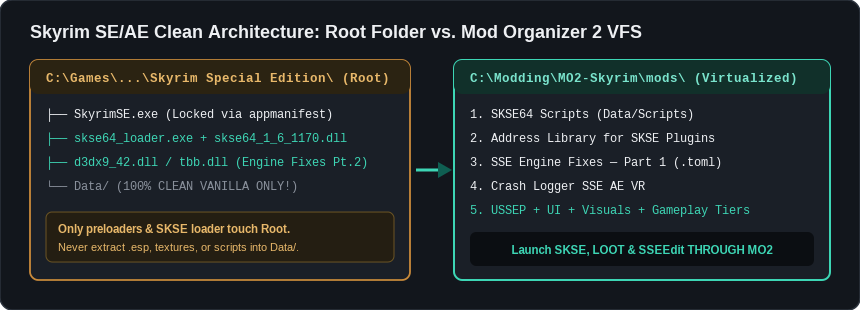
A crash-free Skyrim SE/AE mod list begins before your first visual mod: install Skyrim outside C:\Program Files (x86)\, lock Steam updates via appmanifest_489830.acf, use Mod Organizer 2, match SKSE64 and Address Library to your exact SkyrimSE.exe version, and enable SSE Engine Fixes + Crash Logger first.
Why Skyrim PC Modding Is Stronger Than Ever in 2026
More than a decade after launch, The Elder Scrolls V: Skyrim Special Edition supports one of the deepest free, open-source modding ecosystems in PC gaming. Modern community tooling—SKSE64, Address Library, CommonLibSSE-NG (which lets modern .dll plugins adapt across multiple executables automatically), SSE Engine Fixes, and the open-source Community Shaders graphics stack—lets a modest 8 GB GPU run Skyrim at locked 60+ FPS with dramatically upgraded lighting, modern combat pacing, and clean UI.
However, Bethesda’s Creation Engine still punishes sloppy installation habits. Putting Skyrim inside protected Windows folders, mixing mod managers, exceeding the 254 full-plugin limit, or pulling scripted mods out of an active save will silently degrade stability until your playthrough collapses.
Step Zero: Check Your Exact SkyrimSE.exe Version
Before downloading a single SKSE plugin, right-click SkyrimSE.exe → Properties → Details → Product Version:
| Storefront / Build | Executable Version | SKSE64 Build Needed | Community Support Status |
|---|---|---|---|
| Steam (Current Standard) | 1.6.1170 |
Current AE build (2.2.6+) |
Primary target for modern mods, Community Shaders & SKSE plugins |
| GOG Edition | 1.6.1179 |
Dedicated GOG SKSE64 build | Strong modern support; always check GOG offset compatibility on DLLs |
| Legacy Downgraded SE | 1.5.97 |
Legacy SE build (2.0.20) |
Only needed for rare unmaintained legacy SKSE plugins |
| Xbox Game Pass (PC) | UWP Sandbox | Unsupported | Blocks SKSE64 injection—cannot run script-extender mods |
Five Non-Negotiable Rules for a Stable Skyrim Mod List
- Keep
Data/100% vanilla: Manage every single mod inside Mod Organizer 2’s Virtual File System (USVFS) so you can reorder or disable mods with zero leftover files. - Never exceed 254 active full plugins: Full
.esmand.espfiles share slots00–FD(254 max). Light plugins (.esland ESL-flagged.espfiles) share slotFEand hold up to 4,096 lightweight plugins safely. - Install Crash Logger SSE AE VR before you need it: Without a crash logger, a sudden CTD forces blind guesswork. With it, the culprit
.dll,.nif, or.espis printed in plain text. - Pick ONE graphics pipeline: Choose either Community Shaders (modular, open-source, 6–8 GB GPU & Steam Deck friendly) or ENBSeries (cinematic presets, 12 GB+ VRAM recommended)—never try to run both simultaneously.
- Lock Steam updates and respect Papyrus saves: Set
appmanifest_489830.acfto Read-Only and never uninstall scripted.pexmods mid-playthrough without a dated backup save.
Inside the Skyrim Free Mods Lab
Follow these five technical guides in order to build and maintain a bulletproof Skyrim setup:
- Skyrim Clean Modding Setup: SKSE64, Address Library & Engine Fixes — Exact UAC-free folder setup, portable MO2 config, SKSE console verification, and
EngineFixes.tomltuning for1.6.1170. - Tested 40-Mod Vanilla+ Skyrim Load Order Blueprint — A modern, cohesive 6-tier Vanilla+ list covering fixes, SkyUI, Skyland/SMIM, Community Shaders, and SimonRim balance.
- Community Shaders vs. ENB (2026): Visuals, VRAM & FPS Comparison — Architectural differences, VRAM budgets, shader caching, and how to switch cleanly between the two.
- How to Read Skyrim Crash Logger Output to Pinpoint CTDs — Decode the 4 critical zones of a
crash-*.logfile to spot bad.nifmeshes,.ddstextures, and NavMesh conflicts in minutes. - Why Uninstalling Scripted Mods Breaks Saves (FallrimTools / ReSaver) — Know which mod types are safe to remove mid-game and how to clean orphaned Papyrus instances safely in emergencies.
Cross-Silo Companion Tools
- Size your texture resolution cap (
1Kvs2Kvs4K) and Windows SSD pagefile budget with our Modded PC RAM & VRAM Allocator. - Verify every pre-launch safety step with the Interactive Mod Load Order Safety Checklist.
Official download sources
We never re-host mod files. Download only from the creators' official pages:
Frequently Asked Questions
Do I need the paid Anniversary Edition DLC bundle to use modern 'AE' Skyrim mods?
Usually no. In the Skyrim modding community, 'AE' almost always refers to the free 1.6.x executable version (such as Steam 1.6.1170) rather than the paid Creation Club bundle. Only modlists or specific patches that explicitly list all Creation Club DLC as masters require the paid upgrade.
Can I mod the Xbox Game Pass / Microsoft Store version of Skyrim on PC?
Not fully. Microsoft's UWP/Game Pass sandbox blocks SKSE64 executable injection, locking you out of SkyUI, Address Library, SSE Engine Fixes, Community Shaders, and most modern frameworks. Use the Steam or GOG edition for full free PC modding.
Is it still necessary to downgrade Skyrim SE to 1.5.97 in 2026?
No. Thanks to CommonLibSSE-NG and updated Address Library builds, nearly every major SKSE plugin and graphics framework now supports Steam 1.6.1170 natively. Downgrading is only necessary for rare unmaintained legacy DLLs.