Skyrim Free Mods Lab
Community Shaders vs. ENB (2026): Visuals, VRAM Usage & FPS Comparison
Short answer
Choose Community Shaders if you run a 6–8 GB GPU, play on Steam Deck/Linux, want fast load times, or prefer modular open-source features with minimal FPS loss. Choose ENBSeries only if you have 12 GB+ VRAM and prioritize hand-crafted cinematic color grading and skin shaders over raw framerate.
Two Completely Different Graphics Architectures
For more than a decade, ENBSeries was the undisputed default for upgrading Skyrim’s aging 2011 lighting. Over the past two years, however, Community Shaders (CS) transformed Skyrim PC modding by taking a fundamentally cleaner architectural path.
- Community Shaders is an open-source SKSE plugin that extends Skyrim’s native DirectX 11 shaders directly inside the engine—managed 100% cleanly inside Mod Organizer 2 without dropping wrapper DLLs into your root game directory.
- ENBSeries is a closed-source external DirectX 11 wrapper (
d3d11.dll) placed in your root Skyrim folder that intercepts draw calls and layers a heavy post-processing, lighting, and per-weather color-grading suite over the frame.
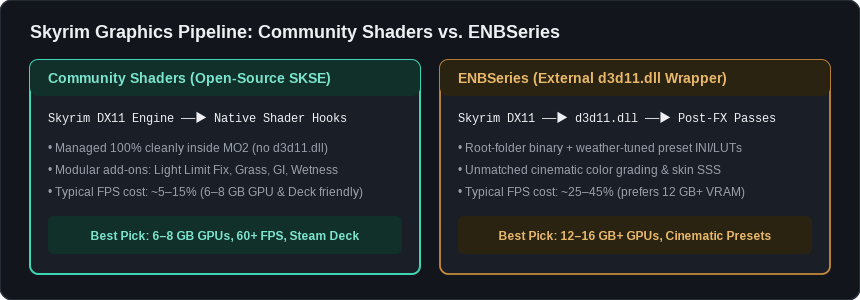
Complete Technical Comparison Matrix
| Technical Factor | Community Shaders (Open Source) | ENBSeries (Closed Source) |
|---|---|---|
| Installation Method | 100% inside Mod Organizer 2 (clean virtual install) | Manual d3d11.dll + d3dcompiler_46e.dll + preset files in root folder |
| Typical GPU FPS Cost | Low–Moderate (~5–15%) depending on enabled add-ons | Moderate–Heavy (~25–45%) on full modern presets |
| VRAM Overhead | Low; runs smoothly on 6–8 GB GPUs and Steam Deck | High; complex grass + parallax + full preset prefers 12–16 GB VRAM |
| Startup Shader Compilation | Fast one-time cache build (rebuilds only when adding CS modules) | Noticeably slower startup compilation, especially after GPU driver updates |
| Feature Modularity | Pick exact features you want (Light Limit Fix, Grass Lighting, Wetness, SSGI) |
Monolithic preset ecosystem (Rudy ENB, Cabbage, NAT.III, Silent Horizons) |
| Linux / Steam Deck Compatibility | Excellent (native SKSE plugin, zero extra DLL override needed beyond Engine Fixes) | Heavy FPS hit + requires WINEDLLOVERRIDES="d3d11=n,b" |
| Color Grading & Artistic Presets | Relies on weather mods (Cathedral / Azurite) + optional Post-Processing / ReShade | Industry-leading per-weather artistic LUTs, bloom, and skin subsurface scattering |
When Community Shaders Is the Clear Winner
Choose Community Shaders (plus Light Limit Fix, Grass Lighting, Wetness Effects, and Subsurface Scattering) if any of these apply:
- You game on a 6 GB or 8 GB GPU (or Steam Deck / laptop): Keeping VRAM below 8 GB prevents catastrophic PCIe swap stutter in dense exterior areas like Falkreath Forest and Riften.
- You prioritize 60–120 FPS smooth frame pacing: Because CS hooks native DX11 passes selectively, you can disable Screen-Space GI on mid-range GPUs while keeping zero-flicker Light Limit Fix and soft grass shadows at virtually no cost.
- You want instant live toggling: Press the
Endkey in-game to open the Community Shaders overlay, toggle individual modules on or off, and check real-time GPU cost per effect. - You value clean open-source maintenance: Community Shaders is publicly audited on GitHub with rapid community bug fixes and native compatibility with SSE Display Tweaks and DLSS/FSR upscaling.
When ENBSeries Still Earns Its GPU Tax
Choose ENBSeries paired with a flagship preset (such as Rudy ENB for Cathedral Weathers, Cabbage ENB for NAT.III, or Pi-CHO) if:
- You have 12 GB–16 GB+ GPU VRAM (e.g., RTX 4070/4070 Ti/4080/5070 or RX 7800 XT/7900 XT) and can comfortably absorb a 30–40% GPU hit at 1440p.
- You want a curated cinematic mood: Veteran ENB preset authors spend hundreds of hours hand-tuning sun rays, dungeon contrast, sky gradients, and character skin scattering across 80+ individual weather IDs. Even with strong weather mods like Azurite or Cathedral, ENB presets still deliver a distinct “next-gen screenshot” atmosphere.
Quick ENB Optimization Tip for 8–10 GB GPUs
If you insist on trying ENB on an 8 GB GPU, open the ENB menu (Shift+Enter), turn Ambient Occlusion down to Low/Medium, disable Complex Grass and Complex Parallax, and cap clutter textures to 1K using our RAM & VRAM Allocator Calculator.
How to Switch Cleanly Between Community Shaders and ENB
Because neither pipeline writes scripts into your .ess save, you can test both on the exact same save file in two minutes:
Switching ENB → Community Shaders
- Navigate to your root
Skyrim Special Edition\folder and delete:d3d11.dllandd3dcompiler_46e.dllenblocal.iniandenbseries.ini- The
enbseries/andenbcache/folders
- Enable Community Shaders and your chosen add-ons in MO2 and launch via SKSE. (Wait 30–60 seconds on first boot while CS builds its fresh shader cache.)
Switching Community Shaders → ENB
- Uncheck Community Shaders and all CS add-ons in MO2’s Left Pane (and clear MO2’s
Overwrite/ShaderCache/folder if present). - Copy
d3d11.dllandd3dcompiler_46e.dllfrom the official ENBSeries WrapperVersion archive + your chosen ENB preset files into your rootSkyrim Special Edition\folder. - Verify your weather mod matches the exact weather mod required by that ENB preset (mixing a NAT.III ENB with Cathedral Weathers breaks brightness and night contrast).
Official download sources
We never re-host mod files. Download only from the creators' official pages:
Frequently Asked Questions
Can I run Community Shaders and ENB at the same time?
No. Community Shaders automatically disables itself the moment it detects ENB's d3d11.dll hook inside the root Skyrim directory. Pick one graphics pipeline per profile.
Do I have to start a new game to switch between Community Shaders and ENB?
No. Both are pure rendering/shader frameworks that never bake Papyrus scripts into your save file. Just remove the old pipeline's files, clear shader caches, and verify your weather mod's preset compatibility.
Does Community Shaders support Parallax textures and Global Illumination?
Yes. Through its modular add-ons (Complex Parallax Materials, Screen Space GI, Light Limit Fix, Wetness Effects, Subsurface Scattering, and Cloud Shadows), Community Shaders covers almost every modern shader feature ENB popularized while remaining open source.