Skyrim Free Mods Lab
Tested 40-Mod Vanilla+ Skyrim Load Order Blueprint (Compatibility & Order Notes)
Short answer
You do not need an unstable 800-mod list to modernize Skyrim. A disciplined ~40-mod Vanilla+ load order built on SKSE fixes, SkyUI, SMIM + Skyland AIO, Community Shaders, and the unified SimonRim gameplay suite stays far below the 254 ESP cap, runs smoothly on 8 GB GPUs, and avoids patch fatigue.
Why a Cohesive 40-Mod Vanilla+ List Outperforms 500-Mod Bloat
Most abandoned modded Skyrim playthroughs die for the exact same reason: scope creep. Players stack three competing combat overhauls, two weather mods, conflicting lighting systems, and bloated 4K clutter textures until frametimes collapse in Whiterun and every tavern doorway requires three compatibility patches.
This 40-Mod Vanilla+ Blueprint takes the opposite engineering philosophy:
- One cohesive author suite per subsystem so perks, magic, combat, and visuals harmonize natively with minimal patching.
- Pure SKSE/ESL-first architecture keeping full
.espcount tiny and papyrus script overhead near vanilla levels. - 8 GB GPU & Steam Deck friendly out of the box (using 1K–2K textures and open-source Community Shaders).
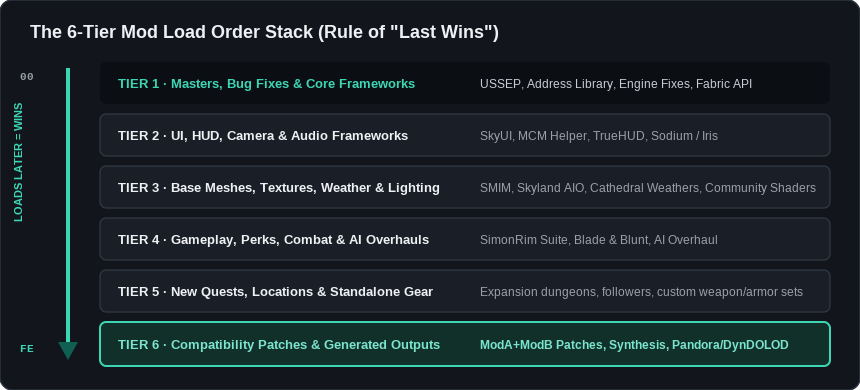
Complete 6-Tier Vanilla+ Load Order Blueprint
Create six MO2 Separators in your Left Pane matching these exact sections (top loads first; bottom wins conflicts):
Tier 1: Core Frameworks & Bug Fixes (Mods 1–10)
(Assumes you already completed our Clean Install & SKSE64 Setup.)
- SKSE64 Scripts (packaged from
Data/Scripts/inside official SKSE archive) - Address Library for SKSE Plugins (All in One — 1.6.x)
- SSE Engine Fixes (Part 1) (+ Part 2 DLLs in root game folder)
- Crash Logger SSE AE VR (PDB Support)
- Unofficial Skyrim Special Edition Patch (USSEP) (fixes thousands of vanilla quest/mesh/script bugs)
- Bug Fixes SSE (engine-level C++ fixes USSEP cannot patch via
.esp) - Scrambled Bugs (modular SKSE bug fixes for perks, enchantments, and reflection)
- powerofthree’s Tweaks (essential engine tweaks & framework dependency)
- powerofthree’s Papyrus Extender (extends script functions for modern mods)
- SSE Display Tweaks (decouples Havok physics from 60 FPS cap, adds borderless performance mode, fixes high-refresh stutters)
Tier 2: UI, HUD & Quality of Life (Mods 11–18)
- SkyUI (pair with SkyUI SE - Flashing Savegames Fix and Difficulty Persistence Fix for
1.6.1170) - MCM Helper (saves Mod Configuration Menu settings across saves cleanly)
- TrueHUD (clean floating enemy health bars, boss bars, and loot feed)
- True Directional Movement (modern 360-degree third-person movement & optional target lock-on)
- Better Dialogue Controls & Better MessageBox Controls (fixes clunky vanilla cursor selection bugs)
- QuickLoot IE (instant Fallout 4-style container preview without pausing into menus)
- A Quality World Map (or Flat World Map Framework for cleaner road visibility)
- Compass Navigation Overhaul (modern quest distance markers on HUD compass)
Tier 3: Base Meshes, Textures, Weather & Lighting (Mods 19–28)
- Static Mesh Improvement Mod (SMIM) (select the optimized/lite mesh preset on 6–8 GB GPUs to save draw calls)
- Skyland AIO (cohesive 1K/2K coverage for architecture, landscapes, dungeons, and caves—loads AFTER SMIM so Skyland textures win)
- Blended Roads (replaces flat painted cobble roads with crisp 3D meshes)
- Cathedral Landscapes (Grass Only) (better performance than vanilla grass with denser coverage)
- Cathedral Weathers and Seasons (lightweight, cohesive weather and lighting moods without heavy script polling)
- Simplicity of Sea (or Water for ENB — realistic water shaders with low VRAM overhead)
- Community Shaders (core open-source DX11 shader framework)
- Light Limit Fix (Community Shaders add-on — eliminates Skyrim’s 4-light-per-mesh flickering bug)
- Grass Lighting & Complex Parallax Materials (Community Shaders add-ons)
- Window Shadows RT (or Lux — choose strictly ONE interior lighting overhaul only)
Tier 4: Cohesive Gameplay & Balance — The SimonRim Suite (Mods 29–35)
Using a single author’s interconnected gameplay suite prevents awkward stat inflation and cross-overhaul conflicts: 29. Mysticism — A Magic Overhaul (must install before Adamant; expands all five spell schools cleanly) 30. Adamant — A Perk Overhaul (balanced, meaningful Vanilla+ skill trees) 31. Mundus — A Standing Stone Overhaul (rebalances early/late-game standing stones) 32. Aetherius — A Race Overhaul (distinct racial passives without breaking lore) 33. Blade and Blunt — A Combat Overhaul (modern stamina management, timed blocking, and injury pacing) 34. Apothecary — An Alchemy Overhaul (turns potions/food into balanced over-time recovery) 35. Arena — An Encounter Zone Overhaul (keeps dungeons challenging past level 25)
Tier 5: Audio, Immersion & Combat Feel (Mods 36–39)
- Audio Overhaul for Skyrim SE (richer environmental acoustics, thunder, and weapon reverb)
- AI Overhaul SSE (gives NPCs realistic daily schedules, weather sheltering, and town routines)
- Precision — Accurate Melee Collisions (replaces Skyrim’s phantom hit-cone with real physical weapon swings; requires Pandora/Nemesis if using custom animations)
- Guard Dialogue Overhaul (restores respectful guard reactivity as you progress)
Tier 6: Patches, INI Tuning & Final Sort (Mod 40+)
- Compatibility Patches & BethINI Pie Output
- Install official patches for any overlapping pair (for example:
AI Overhaul + USSEP Patch,Audio Overhaul + Cathedral Weathers Patch, and your chosen interior lighting patch). - Run BethINI Pie (pointing to your MO2 profile INI folder) using the High preset with Recommended Tweaks checked.
- Launch LOOT through MO2 and click Sort Plugins → Apply.
- Install official patches for any overlapping pair (for example:
Conflict & Bottleneck Audit Table
| Potential Pitfall | How This Blueprint Prevents It |
|---|---|
| Interior Torch/Campfire Flicker | Community Shaders + Light Limit Fix removes the engine’s 4-light-per-mesh cap |
| Floating Lanterns / Dark Interiors | Strictly ONE weather mod (Cathedral) + ONE interior lighting overhaul |
| Physics Explosions Over 60 FPS | SSE Display Tweaks locks Havok simulation timing independently of monitor Hz |
| VRAM Overflow on 8 GB GPUs | Skyland AIO (1K–2K) + Community Shaders avoids heavy 4K clutter and ENB overhead |
| Mid-Save Script Bloat | Zero heavy cloak-script polling mods; SimonRim uses lightweight native perks/records |
Post-Install Verification Before Starting Your Main Playthrough
- Check MO2’s top-right notification icon—confirm zero missing masters and zero mismatched Form 43 (Oldrim) plugins.
- Launch SKSE, open the console on the main menu (
~), and typecoc riverwoodto jump straight into an exterior test cell. - Walk through Riverwood into the Sleeping Giant Inn, draw a weapon, open the SkyUI inventory, and confirm:
- Stable frametimes and zero purple/missing textures.
- Zero dark-face glitches on Gerdur, Alvor, or Delphine.
- Clean MCM entries under System → Mod Configuration.
- Quit to desktop and start a fresh New Game for your actual playthrough.
Official download sources
We never re-host mod files. Download only from the creators' official pages:
Frequently Asked Questions
What is Skyrim's 254 plugin limit and how close does this 40-mod list come?
Skyrim SE/AE allows up to 254 full active plugins (.esm and .esp in slots 00–FD) plus up to 4,096 light ESL-flagged plugins (sharing slot FE). Because most modern fixes and UI mods in this blueprint are pure SKSE DLLs or ESL-flagged plugins, this entire 40-mod setup uses fewer than 35 full ESP slots.
Can I swap Community Shaders for ENB in this blueprint?
Yes. Simply skip Mods #23–25 (Community Shaders and its add-ons) and install ENBSeries + a Cathedral Weathers ENB preset like Rudy ENB if you have a 12 GB+ VRAM GPU.
Should I sort this list with LOOT after installing all 40 mods?
Yes—launch LOOT through Mod Organizer 2, apply its sorted plugin order, and then double-check that every compatibility patch sits strictly below both of its parent plugins.