Skyrim Free Mods Lab
Skyrim Clean Modding Setup: SKSE64, Address Library & Engine Fixes Step-by-Step
Short answer
Before installing any textures or gameplay mods, complete five foundation steps: move Skyrim outside C:\Program Files (x86)\, lock appmanifest_489830.acf, set up portable Mod Organizer 2, install SKSE64 + Address Library matching your exact exe version, and configure SSE Engine Fixes Part 1 & Part 2.
Why 90% of Skyrim Instability Starts in the First 15 Minutes
Most unstable Skyrim setups fail long before the player installs their first dragon retexture or combat overhaul. Skipping clean directory placement, forgetting SSE Engine Fixes Part 2, or leaving Steam auto-updates unlocked plants invisible landmines that erupt 20 hours into a playthrough.
Follow this exact five-step foundation once and every mod list you build on top of it will stay clean, fast, and reversible.
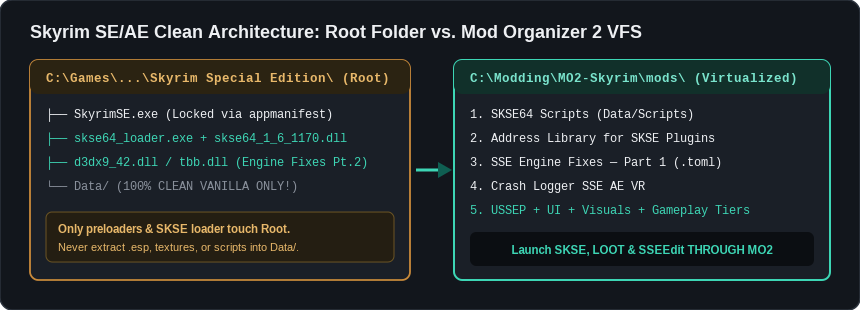
Step 1: Move Skyrim Outside Protected Windows Directories
Never mod Skyrim inside C:\Program Files (x86)\Steam\steamapps\common\. Windows UAC virtualizes writes inside Program Files, breaking SKSE plugins and INI updates silently.
- In Steam, go to Settings → Storage → Add Drive (or create a secondary library folder on your SSD such as
C:\Games\SteamLibrary\orD:\SteamLibrary\). - Move Skyrim Special Edition into that clean path:
C:\Games\SteamLibrary\steamapps\common\Skyrim Special Edition\ - Launch vanilla Skyrim once through Steam’s launcher so it detects your GPU and writes clean baseline
Skyrim.iniandSkyrimPrefs.inifiles. Close the game at the main menu. - Immediately lock Steam updates by setting
appmanifest_489830.acfto Read-only using our Backup & Version Locking Guide.
Step 2: Set Up a Portable Mod Organizer 2 Instance
- Download the latest Mod Organizer 2 installer or archive from GitHub Releases and place it in a short, clean path outside Program Files—for example:
C:\Modding\MO2-Skyrim\ - On first boot, select Create a portable instance → Skyrim Special Edition.
- Connect MO2 to your Nexus Mods account (
Tools → Settings → Nexus → Connect to Nexus) so clicking “Mod Manager Download” onnexusmods.comroutes verified archives straight into MO2. - Open Configure Profiles (ID card icon at top-left) and enable both:
- Use profile-specific Save Games
- Use profile-specific Game INI Files
- Automatic Archive Invalidation
Isolating saves and INI files per profile guarantees your modded playthrough never touches vanilla saves.
Step 3: Install SKSE64 Matching Your Exact SkyrimSE.exe Build
Right-click SkyrimSE.exe → Properties → Details → Product Version. Current Steam installs report 1.6.1170 (GOG installs report 1.6.1179).
- Download the exact matching SKSE64
.7zarchive fromskse.silverlock.org(never from third-party mirrors). - Extract only these root files directly into
Skyrim Special Edition\(next toSkyrimSE.exe):skse64_loader.exeskse64_1_6_1170.dll(filename matches your exact build)
- Create a zip of the archive’s
Data\folder (which holdsData\Scripts\*.pex) and install that zip as a normal mod inside MO2 namedSKSE64 Scripts. Keeping SKSE scripts inside MO2 keeps your baseData\folder 100% vanilla. - Restart MO2. Verify SKSE now appears in the top-right executable dropdown.
Confirm SKSE64 Is Running Properly
Make sure Steam is open in the background, select SKSE in MO2, click Run, press the tilde key (~) on the main menu to open the console, and type:
getskseversionYou should see SKSE64 version: 2.2.6, release idx .... If the console prints Script command "getskseversion" not found, check that skse64_loader.exe sits beside SkyrimSE.exe and that you launched SKSE (not Skyrim Special Edition) in MO2.
Step 4: Install the Four Mandatory Stability Frameworks
Download all four directly from Nexus Mods (always choosing the 1.6.x / AE build for Steam 1.6.1170):
| Framework | Install Target | Core Engine Bug It Fixes |
|---|---|---|
| Address Library for SKSE Plugins (All in One — 1.6.x) | MO2 Left Pane | Maps version-independent memory addresses required by modern SKSE DLL plugins |
| SSE Engine Fixes — Part 1 | MO2 Left Pane | Fixes the 512 open file handle cap (false save corruption), double perks on reload, and memory allocator bugs |
| SSE Engine Fixes — Part 2 | Manual extract into root Skyrim Special Edition\ (d3dx9_42.dll, tbb.dll, tbbmalloc.dll) |
Preloads Engine Fixes before Skyrim initializes |
| Crash Logger SSE AE VR (PDB Support) | MO2 Left Pane | Writes readable stack traces to Documents/My Games/Skyrim Special Edition/SKSE/ on any CTD |
Verify EngineFixes.toml for Steam 1.6.1170
In MO2, double-click SSE Engine Fixes - Part 1 → Filetree → open SKSE/Plugins/EngineFixes.toml and confirm these baseline settings:
[Fixes]
MaxStdio = 8192                 # Eliminates false save-corruption bugs on large mod lists
RegularQuicksaves = true        # Converts F5 quicksaves into safer regular saves

[Patches]
MemoryManager = true            # Replaces Bethesda's aging memory allocator
EnableAchievementsWithMods = true
(Important for Steam 1.6.1170: Always download the updated 1.6.1170+ build of SSE Engine Fixes—older 1.6.640 builds disable plugins on launch unless EnableAchievementsWithMods and Steam-integration flags are patched.)
Step 5: Verify Part 2 Preloader Loaded Cleanly
Launch SKSE once, close the game, and open:
Documents\My Games\Skyrim Special Edition\SKSE\d3dx9_42.logYou should see a line confirming EngineFixes.dll preloaded with zero errors. If d3dx9_42.log does not exist at all, verify that Microsoft Visual C++ Redistributable (x64) is installed and that Part 2’s three DLLs sit directly next to SkyrimSE.exe (not inside Data\).
Once this 5-step foundation passes cleanly, move directly into our Tested 40-Mod Vanilla+ Skyrim Load Order Blueprint.
Official download sources
We never re-host mod files. Download only from the creators' official pages:
Frequently Asked Questions
Why must Skyrim be installed outside C:\Program Files (x86)\?
Windows User Account Control (UAC) aggressively protects Program Files directories, causing silent file-write failures for SKSE64 DLL hooks, Mod Organizer 2's USVFS virtual file system, and external patchers like Pandora, Nemesis, and DynDOLOD.
Do SSE Engine Fixes Part 1 and Part 2 install the same way?
No. Part 1 (the SKSE plugin DLL and EngineFixes.toml) installs like a normal mod inside Mod Organizer 2. Part 2 (d3dx9_42.dll, tbb.dll, and tbbmalloc.dll) must be extracted manually into your root Skyrim Special Edition folder right next to SkyrimSE.exe.
What happens if I install the SKSE64 Scripts folder directly into Skyrim/Data instead of MO2?
It still functions, but polluting your real Data folder makes future cleanups and SKSE updates harder. Packaging Data/Scripts as a regular MO2 mod lets you update or inspect script overwrites cleanly in one click.