Minecraft Free Mods Lab
Free Minecraft Modding Hub: Loaders, Tested FPS Stacks & Crash Fixes (2026)
Short answer
Modern Minecraft Java modding (26.x drops and 1.21.x) runs on two active ecosystems—Fabric for lightweight performance and day-one drops, and NeoForge for heavy content modpacks—while legacy Forge remains essential for classic 1.20.1 and 1.12.2 packs. Always use isolated instances and download exclusively from Modrinth or CurseForge.
The State of Minecraft Java Modding in 2026
Minecraft Java modding looks markedly different in 2026 than it did even two years ago. First, Mojang transitioned Java Edition away from legacy 1.x numbering into calendar year-based Game Drops (26.1, 26.2, 26.3, with 26.4 moving through pre-releases). Because Mojang ships incremental gameplay and engine drops multiple times a year, blind auto-updating breaks Mixins and mod loaders faster than ever—making isolated instances mandatory for every player.
Second, the decade-old “Fabric for FPS, Forge for content” rule has evolved:
- Fabric remains the fastest-updating, lowest-RAM-overhead loader for Vanilla+ gameplay, day-one
26.xdrops, client optimization, and lightweight SMP servers. - NeoForge has decisively replaced legacy Forge as the modern standard for massive tech, magic, and kitchen-sink modpacks on
1.21.1+and26.x—and Sodium officially ships native NeoForge builds, removing the biggest historic reason to avoid NeoForge on weaker GPUs. - Legacy Forge stays preserved strictly for evergreen classic versions (
1.20.1,1.16.5, and1.12.2) where beloved older packs like RLCraft and classic FTB releases still live.
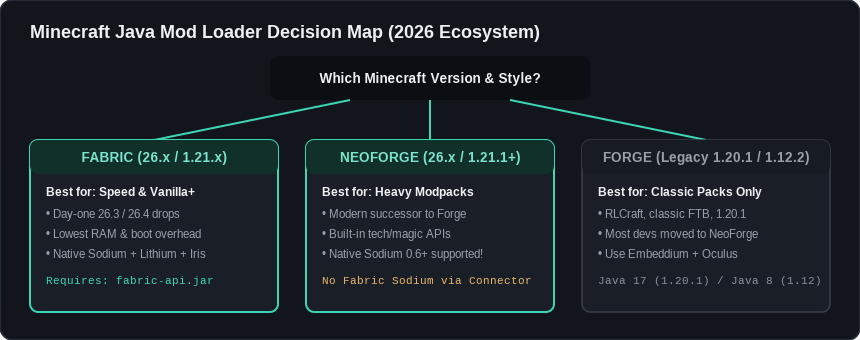
Quick Start Matrix: Match Your Goal to the Right Stack
| Your Goal | Target Game Version | Loader | Java Runtime | Recommended Starter Core |
|---|---|---|---|---|
| Highest FPS on Newest Drop | Java 26.3 |
Fabric | Java 21+ | Fabric API + Sodium + Lithium + FerriteCore + ImmediatelyFast |
| Heavy Tech/Magic Modpack | Java 26.3 or 1.21.1 |
NeoForge | Java 21+ | Native NeoForge Sodium + FerriteCore + Entity Culling + ModernFix |
| Low-End Laptop / Steam Deck | Java 26.3 |
Fabric | Java 21+ | Sodium + Lithium + ImmediatelyFast + Entity Culling + MakeUp Ultra Fast |
| Classic Legacy Modpacks | Java 1.20.1 |
Legacy Forge | Java 17 | Embeddium + Oculus + ModernFix + FerriteCore + Canary/Radium |
| Retro Kitchen-Sink Classics | Java 1.12.2 |
Legacy Forge | Java 8 | VintageFix + CensoredASM / Cleanroom (pack-specific) |
Five Rules That Prevent 95% of Minecraft Mod Crashes
- Never use the shared
.minecraft/modsdirectory: Create one isolated instance per Minecraft version and loader inside Prism Launcher or the Modrinth App. - Never install Fabric Sodium inside NeoForge via Sinytra Connector: Native NeoForge builds of Sodium exist for
1.21.1+and26.x—bridging Fabric Sodium through Connector crashes immediately. - Never allocate excessive heap RAM: Giving Minecraft
16 GBon a lightweight pack triggers stop-the-world Java Garbage Collection hitches. Stick to4 GBfor Vanilla+ and6–8 GBfor heavy packs. - Drop OptiFine on modern versions: Closed-source OptiFine breaks rendering Mixins across modern content mods; use Sodium + Iris (plus Continuity and Zoomify for connected textures and zoom).
- Read
logs/latest.logbefore reinstalling anything: “Exit Code 1” simply means Java stopped with an error—the real mod culprit is almost always named in the final 40 lines oflatest.log.
Inside the Minecraft Free Mods Lab
Work through our five technical guides depending on where you are in your setup:
- Fabric vs. NeoForge vs. Forge (2026) — Deep architecture breakdown (Mixins vs. Event Bus APIs), native Sodium support, Sinytra Connector limits, and
latest.logloader checks. - Tested Minecraft FPS Optimization Mod Stack — Target all six distinct frame-time bottlenecks without stacking conflicting mods, plus Sodium video tuning.
- Best Free Shaders for Low-to-Mid Spec PCs — Compare MakeUp Ultra Fast, Sildur’s Enhanced Default, Complementary, BSL, and Bliss with a 4-knob GPU tuning recipe.
- Isolated Minecraft Mod Instances (Prism Launcher vs. Modrinth App) — Step-by-step instance setup, per-instance Java runtimes, and safe drop-upgrade cloning.
- How to Read Crash Logs & Fix Exit Code 1 — Decode
MixinApplyError,UnsupportedClassVersionError,MissingModsException, and OpenGL driver crashes fast.
Cross-Silo Companion Tools
- Calculate exact
-Xmxheap limits and generate tuned Java 21+ G1GC flags with our Modded PC RAM & VRAM Allocator. - Run the Interactive Pre-Launch Safety Checklist before opening an existing survival world after updating mods.
Official download sources
We never re-host mod files. Download only from the creators' official pages:
Frequently Asked Questions
Do free Minecraft Java mods work on Bedrock Edition (Xbox, PlayStation, Mobile)?
No. Java Edition .jar mods (Fabric, NeoForge, Forge) run exclusively on Minecraft: Java Edition on Windows, macOS, and Linux/Steam Deck. Bedrock Edition uses an entirely different Add-On and Behavior Pack format.
Do I still need OptiFine in 2026?
No. For modern Minecraft (1.20.1 through 26.x), Sodium + Iris (on Fabric or native NeoForge) or Embeddium + Oculus (on legacy Forge 1.20.1) outperform OptiFine dramatically and avoid OptiFine's closed-source rendering crashes with other mods.
Which Java version do I need for modded Minecraft in 2026?
Minecraft 1.20.5, 1.21.x, and all 26.x drops require Java 21 or newer. Legacy 1.20.1 and 1.18–1.20.4 packs require Java 17, and classic 1.12.2 packs require Java 8. Prism Launcher manages per-instance Java runtimes automatically.