Minecraft Free Mods Lab
Fabric vs. NeoForge vs. Forge (2026): Which Minecraft Mod Loader Should You Use?
Short answer
Choose Fabric for day-one 26.x drops, Vanilla+, and lowest RAM/boot overhead. Choose NeoForge for large tech, magic, or kitchen-sink modpacks on 1.21.1+ and 26.x (it now supports official native Sodium builds). Only choose legacy Forge if you are playing established older versions like 1.20.1, 1.16.5, or 1.12.2.
Why Most Mod Loader Guides Are Outdated in 2026
Search for Minecraft mod loader advice and you will still run into two stale claims repeated everywhere: that 1.20.1 or 1.21 is the current ceiling, and that you must pick Fabric if you want Sodium’s FPS boost. Both claims are outdated.
Mojang shifted Minecraft Java Edition to calendar year-based Game Drops in 2026 (26.1, 26.2, 26.3, with 26.4 moving through pre-releases). At the same time, NeoForge has cemented itself as the modern successor to Forge for heavy content modpacks, and Sodium officially ships native NeoForge builds (starting with Sodium 0.6.0 on 1.21.1+ and continuing across modern 26.x drops).
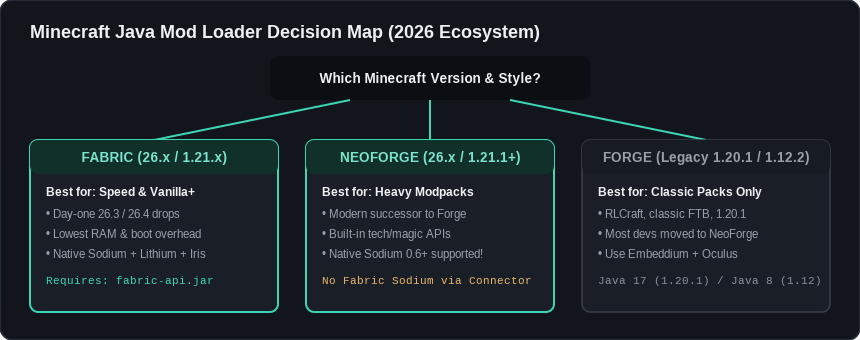
Complete Technical Comparison Matrix
| Specification | Fabric | NeoForge | Forge (Legacy) |
|---|---|---|---|
| Role in 2026 | Primary lightweight, optimization & fast-update loader | Primary modern standard for large tech/magic packs | Legacy maintenance for older classic versions |
| Primary Versions | Latest drops (26.x), snapshots, 1.21.x, 1.20.1 |
1.21.1+ through 26.x |
1.20.1, 1.16.5, 1.12.2 and earlier |
| Core Architecture | Minimal core loader + Mixin bytecode injection + external Fabric API |
Built-in rich API, event buses, standardized registries & capabilities | Pre-split monolithic Forge API |
| Update Speed on Drops | Fastest (often snapshot & day-one drop releases) | Fast on stable drops (26.x / 1.21.x) |
Slow; most active devs moved to NeoForge |
| Native Sodium Support | Yes (native) | Yes (native since Sodium 0.6.0 on 1.21.1+) |
No (use Embeddium + Oculus on 1.20.1) |
| Startup & Idle RAM | Lowest (fastest cold boot) | Moderate | Highest |
| Cross-Loader Support | Fabric only | NeoForge (+ partial Fabric via Sinytra Connector) | Legacy Forge only |
Under the Hood: How Each Loader Actually Modifies Minecraft
Understanding how these three loaders hook into Minecraft’s Java bytecode explains why they behave differently—and why mixing .jar files across loaders fails immediately.
1. Fabric: Lightweight Core + Mixin Injection
Fabric Loader itself intentionally stays tiny. It avoids rewriting huge swaths of Minecraft’s vanilla code; instead, it loads SpongePowered Mixin, which injects surgical bytecode hooks into specific vanilla methods at runtime. Shared gameplay hooks (custom item groups, networking packets, biome registration, lifecycle events) are split out into a separate optional mod called Fabric API.
- Why players love it: Because Fabric skips initializing massive cross-mod capability buses when you only want 25 Vanilla+ or optimization mods, cold launch times are snappy and idle heap overhead stays low.
- The classic beginner trap: Installing Fabric Loader cleanly and forgetting to place
fabric-api-*.jarintomods/. WithoutFabric API, almost every gameplay and UI mod will halt at startup with aMissingModsException.
2. NeoForge: Modernized Architecture for 200+ Mod Packs
NeoForge launched in mid-2023 when nearly the entire active Forge maintainer team forked the repository to modernize development practices and eliminate legacy bottlenecks. Starting at 1.20.2, NeoForge broke binary compatibility with old Forge to redesign networking, data attachments, and registries cleanly.
- Why giant modpacks prefer it: When a kitchen-sink pack combines 250+ automation, energy, fluid-pipe, and magic mods (such as modern All the Mods iterations), standardized built-in APIs let different authors plug into shared power and inventory interfaces without colliding over raw Mixin targets.
- Bonus for modern players: Because Sodium and Lithium now maintain official/cross-loader NeoForge support on modern versions, you no longer sacrifice smooth frame pacing to play big content packs.
3. Legacy Forge: Preserved Exclusively for Classic Versions
Legacy Forge powered modded Minecraft for over a decade and still holds the crown for iconic older versions—especially 1.20.1 and 1.12.2 (RLCraft, SevTech: Ages, classic FTB packs). On 1.21+ and 26.x, however, new flagship mods overwhelmingly target NeoForge and/or Fabric. Starting a brand-new 26.3 profile on legacy Forge leaves you stranded with a shrinking catalog.
Three Real-World Compatibility Traps to Avoid
Trap 1: Bridging Fabric Sodium Through Sinytra Connector
On NeoForge, Sinytra Connector + Forgified Fabric API (FFAPI) can translate many Fabric gameplay and UI mods so they run inside a NeoForge pack. Never attempt this with Fabric’s build of Sodium.
- Why it crashes: Sodium deeply rewrites Minecraft’s OpenGL chunk rendering pipeline. Running Fabric Sodium through Connector’s bytecode translation layer produces instant startup crashes or missing world rendering.
- The clean solution:
- On NeoForge (
1.21.1+/26.x): Download the official native NeoForge build of Sodium directly from Modrinth or CurseForge—zero Connector required. - On Legacy Forge (
1.20.1): Pair Embeddium (a high-compatibility Forge port of Sodium) with Oculus for shader support.
- On NeoForge (
Trap 2: Reusing a Shared .minecraft/mods Directory Across 26.x Drops
Mojang’s numbered drops (26.1 → 26.2 → 26.3) regularly refactor internal class names and Mixin anchors. Dropping even a 26.2 mod into a 26.3 instance frequently throws an InvalidInjectionException. Always keep each drop isolated inside Prism Launcher or the Modrinth App (see our Isolated Instance Setup Guide).
Trap 3: Mismatched Java Runtimes
Modern Minecraft (1.20.5+, 1.21.x, and 26.x) requires Java 21+, whereas legacy 1.20.1 expects Java 17 and 1.12.2 expects Java 8. Launching a 26.3 NeoForge or Fabric instance with Java 17 fails immediately with UnsupportedClassVersionError.
How to Verify Your Active Loader in logs/latest.log
Before troubleshooting any mod conflict, open your instance’s logs/latest.log and inspect the top 10 lines to verify your game version, loader build, and mod list align:
[main/INFO]: Loading Minecraft 26.3 with Fabric Loader 0.16.x  <-- 1. Game & loader version
[main/INFO]: Loading 38 mods:
    - fabric-api ...                                           <-- 2. Required API present
    - lithium ...                                              <-- 3. Loader-matched mod jars
    - sodium ...
If the log prints Incompatible mod set! or MixinApplyError, jump straight to our Exit Code 1 & Crash Log Decoding Guide.
Final 4-Step Decision Tree
- Playing a premade modpack? Always use the exact loader and Minecraft version the pack author built it for—never try to convert a pack between Fabric and NeoForge manually.
- Building a
26.xVanilla+, SMP client, or maximum-FPS setup? Choose Fabric (Fabric API+Sodium+Lithium+FerriteCore+Iris). - Building a
26.xor1.21.1heavy tech/magic/RPG modpack? Choose NeoForge (+ native NeoForgeSodium+FerriteCore). - Revisiting classic
1.20.1or1.12.2modpacks? Choose Legacy Forge (+EmbeddiumandOculuson1.20.1).
Official download sources
We never re-host mod files. Download only from the creators' official pages:
Frequently Asked Questions
Can Fabric players join a NeoForge server?
Only if every mod on the client is strictly client-side (like Sodium, Iris, or minimaps) and the server runs zero content mods requiring client registration. The moment a server adds custom blocks, items, or entities, your client must run the exact same loader and mod list.
Can I run Fabric Sodium inside NeoForge using Sinytra Connector?
No. Fabric's build of Sodium is fundamentally incompatible with Sinytra Connector and Forgified Fabric API and will crash on startup. On NeoForge (1.21.1+ and 26.x), download the official native NeoForge build of Sodium directly.
Is Quilt still worth choosing in 2026?
For nearly all players, no. Although Quilt forked from Fabric with ambitious tooling goals, the vast majority of mod developers stayed on Fabric or moved to NeoForge. Unless a specific mod explicitly requires Quilt, stick with Fabric.
Why can't NeoForge run Forge 1.20.1 mods directly?
NeoForge intentionally broke binary compatibility with legacy Forge starting at Minecraft 1.20.2 so maintainers could modernize APIs, clean up deprecated registries, and strip out decade-old technical debt.