Minecraft Free Mods Lab
Tested Minecraft FPS Optimization Mod Stack (Sodium, Lithium, FerriteCore)
Short answer
Do not pile 25 random 'FPS booster' mods into one folder—overlapping renderer or entity-culling patches cause visual glitches and worse 1% low frametimes. A clean 6-mod core targeting distinct bottlenecks (Sodium, Lithium, FerriteCore, ImmediatelyFast, Entity Culling, and ModernFix where supported) delivers virtually all achievable FPS gains cleanly.
Why “Install Every FPS Mod” Backfires
A common mistake is opening Modrinth, filtering by Optimization, and installing the first twenty mods on the page. In practice, blindly stacking optimization mods frequently degrades stability and 1% low frametimes because multiple mods inject competing Mixins into Minecraft’s chunk builder, entity renderer, and memory manager.
The engineering-first approach is simple: identify the six distinct performance bottlenecks in Minecraft Java Edition and install one proven, actively maintained, open-source mod for each.
The Clean 6-Mod Optimization Stack (Mapped by Bottleneck)
| Hardware / Engine Bottleneck | Fabric / Modern NeoForge (26.x / 1.21.x) |
Legacy Forge (1.20.1) |
What It Actually Optimizes |
|---|---|---|---|
| 1. Chunk Rendering (GPU & CPU) | Sodium (native on both Fabric & NeoForge) | Embeddium | Replaces Minecraft’s legacy OpenGL chunk renderer; eliminates chunk-update stutters and lifts both average FPS and 1% lows |
| 2. Game Logic & Physics Ticks | Lithium | Canary / Radium | Optimizes mob AI pathfinding, block ticking, and chunk physics in single-player and hosted servers with zero vanilla-mechanic changes |
| 3. RAM Footprint | FerriteCore | FerriteCore | Deduplicates identical blockstate tables in memory, routinely cutting JVM RAM usage by 30–45% |
| 4. Storage Rooms, Mobs & HUD | ImmediatelyFast | ImmediatelyFast | Batches immediate-mode draw calls (chests, signs, item frames, mobs, maps, HUD text) so big bases stop tanking FPS |
| 5. Occluded Mobs & Block Entities | Entity Culling | Entity Culling | Uses async ray-tracing to skip rendering entities and tile entities hidden behind solid walls |
| 6. Launch Speed & Memory Leaks | ModernFix (verify drop availability) | ModernFix | Cuts modded startup time dramatically and patches several memory leaks inside large content packs |
Optional Add-On for High-Core-Count CPUs
- C2ME (Concurrent Chunk Management Engine — Fabric): Multithreads chunk generation and disk I/O across modern 6–16 core CPUs, making high-speed Elytra flight dramatically smoother. Test carefully if you run heavy custom world-generation data packs, as aggressive multithreading increases CPU utilization and heat on laptops.
Optional OptiFine Replacement Trio (Zero Performance Penalty)
If you miss OptiFine’s visual extras after switching to Sodium + Iris, add these lightweight, open-source replacements instead:
- Continuity — Connected glass/bookshelf textures.
- Zoomify — Smooth customizable spyglass/camera zoom.
- LambDynamicLights — Handheld torch and glowing entity lighting.
Four Obsolete or Counterproductive Mods to Skip in 2026
- OptiFine: Closed-source, breaks Mixin hooks across modern mods, updates slowly on
26.xdrops, and lags behind Sodium in chunk-rebuild frame pacing. - Phosphor & Starlight (on
1.21+/26.x): Mojang overhauled Minecraft’s native lighting engine in 1.20+, making lighting-engine overhauls unnecessary on modern drops. - Conflicting Culling Pairs: Do not stack Entity Culling alongside MoreCulling’s overlapping entity features or experimental third-party fog/culling tweaks without auditing config flags—duplicates waste CPU threads.
- “Ultra FPS” Texture Packs That Disable Mipmaps: Stripping textures to 1×1 flat colors rarely boosts FPS on modern GPUs because Minecraft without shaders is overwhelmingly CPU-bound on chunk geometry and game ticks.
Five Sodium Video Settings With the Biggest Real Impact
Once Sodium is installed, open Options → Video Settings and dial in these five settings rather than blindly dragging everything to Minimum:
- Simulation Distance vs. Render Distance (Biggest CPU Lever): Keep Simulation Distance at
6–8 chunkseven when your Render Distance is12–16 chunks. Simulation Distance controls how far away mobs pathfind, redstone ticks, and crops grow—trimming it halves CPU tick load while keeping distant mountains visible. - Chunk Update Threads: Leave at
0(Auto) on desktop CPUs. On thin-and-light laptops experiencing audio crackle or stutters while sprinting, set this manually to roughly half your physical CPU cores (2or4). - Always Defer Chunk Updates: Keep Enabled for smooth camera rotation. Only turn it off if you notice brief one-frame visual flashes when instant-mining blocks with Haste II.
- Entity Shadows: Disable near dense villager trading halls or animal farms to save hundreds of wasted draw calls.
- Max Framerate / VSync: Cap FPS at your monitor’s refresh rate (or use Adaptive Sync / G-Sync / FreeSync). Running uncapped at 400 FPS on a 60 Hz laptop screen just saturates thermals until CPU throttling causes sudden drops.
The Hidden Stutter Killer: Fixing Your JVM RAM Allocation
Even a spotless 6-mod Sodium stack will hitch every 5–10 seconds if your Java heap (-Xmx) is misconfigured. Minecraft consumes both JVM Heap and Off-Heap Native Memory (LWJGL, OpenGL buffers, audio). Giving a lightweight 16 GB PC -Xmx12G starves Windows/macOS and creates massive Garbage Collection stop-the-world pauses.
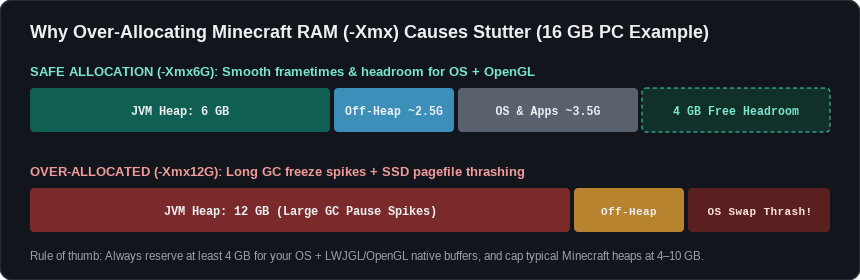
- Vanilla+ / 6-Mod Optimization Stack:
4 GB(-Xmx4G) is the sweet spot. - Mid-Size Content Packs (60–180 mods):
6 GB(-Xmx6G). - Heavy Kitchen-Sink Modpacks (200+ mods):
8–10 GB(-Xmx8Gto-Xmx10G).
Use our Modded PC RAM & VRAM Allocator Calculator to generate exact, copy-ready Java 21+ G1GC flags tailored to your total system RAM and GPU VRAM.
Official download sources
We never re-host mod files. Download only from the creators' official pages:
Frequently Asked Questions
Why did adding more performance mods actually make my Minecraft stutter worse?
Usually two causes: stacking redundant mods that fight over the same Mixin hooks (like two chunk-render or culling mods), or allocating far too much RAM (such as 16 GB on a light pack), which triggers long Java Garbage Collection stop-the-world pauses.
Do I still need Starlight or Phosphor for lighting optimization?
No. Mojang rewrote Minecraft's vanilla lighting engine starting in 1.20, making Phosphor obsolete and removing the need for Starlight on modern 1.21.x and 26.x versions.
Are client-side optimization mods like Sodium and Lithium allowed on multiplayer servers?
Yes. Sodium, FerriteCore, ImmediatelyFast, and Entity Culling are purely client-side performance engines that do not alter gameplay mechanics or send unfair packets. (Lithium optimizes server-side tick logic when playing single-player or hosting your own server.)