Troubleshooting & Tools
Modding Troubleshooting Lab & Free Browser Utilities (2026)
Short answer
Before wiping a broken modpack or blindly guessing at memory sliders, run systematic diagnostics: configure safe memory/VRAM limits with our browser allocator, verify setup hygiene with our interactive checklist, isolate silent crashes via 50/50 binary search, and inspect unfamiliar binaries with VirusTotal.
Systematic Mod Troubleshooting Beats Trial-and-Error
When a 150-mod setup crashes to desktop, freezes on load, or displays bright purple textures, most players react by reinstalling the entire game or deleting random mods until something happens to boot. That wastes hours and rarely teaches you why the setup broke.
Every tool and playbook in this silo is built around repeatable engineering diagnostics—narrowing down hardware bottlenecks, missing dependencies, silent mod conflicts, and security risks in minutes instead of weekends.
Free Browser-Based Modding Utilities (Zero Login, Local-Only)
Both utilities run purely inside your browser with full technical documentation underneath:
| Interactive Utility | What It Calculates / Generates | Best Used When |
|---|---|---|
| Mod Pre-Launch & Load Order Safety Checklist | Game-specific verification checklists (Minecraft, Skyrim, General PC), live readiness score, browser localStorage save, and Markdown export |
Starting a new playthrough, updating a modpack, or preparing a clean bug report |
| Modded PC RAM & VRAM Allocator Calculator | Optimal -Xmx JVM heap limits, copy-ready Java 21+ G1GC flags, Skyrim texture resolution caps (1K/2K/4K), SSD pagefile targets, and bottleneck warnings |
Setting up Prism Launcher memory sliders, picking shader/ENB tiers, or fixing stutter |
Universal Cross-Game Troubleshooting Playbooks
When a crash, visual glitch, or suspicious download hits any modded PC game, open the matching diagnostic playbook below:
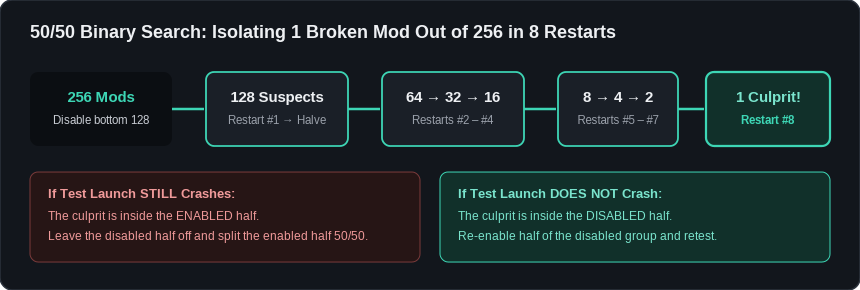
- The 50/50 Binary Search Method — Isolate any single broken mod out of 256+ in at most 8 restarts (and solve tricky two-mod conflicts when neither mod crashes alone).
- Fixing Missing Textures, Purple Checkerboards & Broken Meshes — Diagnose double-nested archive folders, missing parent dependencies, Archive Invalidation, and Skyrim dark-face mismatches.
- Checking Mod Archives, DLLs & JARs With VirusTotal — Inspect archive extensions in 7-Zip, compute local SHA-256 hashes, and distinguish unsigned-DLL false positives from genuine info-stealers.
Rapid Symptom-to-Fix Triage Table
Use this quick lookup table to route any error straight to the right page across our site:
| Exact Symptom You Are Seeing | First Place to Look | Direct Playbook |
|---|---|---|
Minecraft Exit Code 1 on launch |
logs/latest.log (Caused by: / from mod) |
Fix Exit Code 1 & Crash Logs |
| Skyrim instant CTD or cell-load crash | Documents/.../SKSE/crash-*.log (REGISTERS) |
Read Skyrim Crash Logs |
| Periodic 0.5-second freeze spikes in Minecraft | Over-allocated -Xmx heap (G1GC pause spikes) |
RAM & VRAM Allocator |
Purple surfaces, checkerboards, or giant ! |
Folder nesting / Archive Invalidation / missing master | Fix Missing Textures & Meshes |
| Crash log blames vanilla executable only | Reproducible crash inside isolated test profile | 50/50 Binary Search Method |
| Windows Defender flags a downloaded mod | File source, 7-Zip inspection, SHA-256 & VirusTotal | Mod Malware & VirusTotal Guide |
The 3-Artifact Standard for Getting Fast Community Help
If you ever need help in a mod author’s Discord server, GitHub Issues tracker, or subreddit, attaching these three artifacts gets accurate answers ten times faster than posting “help my game crashed”:
- Exact Game Build & Loader Version: e.g.,
Minecraft Java 26.3 + Fabric 0.16.x + Java 21orSkyrim Steam 1.6.1170 + SKSE 2.2.6. - Your Exported Checklist & Hardware Spec: Copy directly from our Load Order Safety Checklist.
- Full Unedited Log Link: Upload
latest.logtomclo.gsor Skyrim’s Crash Logger output to Pastebin rather than pasting cropped screenshots of two error lines.
Official download sources
We never re-host mod files. Download only from the creators' official pages:
Frequently Asked Questions
Do the interactive tools on FreeGameMods upload my PC data or mod lists to a server?
No. Both our Pre-Launch Safety Checklist and RAM/VRAM Allocator execute 100% client-side inside your web browser. Checklist progress is saved locally via your browser's localStorage and never leaves your device.
Do these troubleshooting guides work for games beyond Minecraft and Skyrim?
Yes. The 50/50 binary search workflow, texture/archive invalidation fixes, and SHA-256 / VirusTotal malware checks apply to virtually any moddable PC game—including Fallout 4, Cyberpunk 2077, Baldur's Gate 3, RimWorld, Valheim, and Stardew Valley.
What should I check first when a modded game suddenly stops launching?
Check whether the base game auto-updated overnight, inspect the newest log file (logs/latest.log or SKSE crash logs), and verify that core dependencies (Fabric API, Address Library, SSE Engine Fixes) match your exact game build before touching gameplay mods.