Troubleshooting & Tools
How to Check Mod Archives, DLLs, and JAR Files for Malware Before Running Them
Short answer
Every Minecraft .jar mod and Skyrim SKSE .dll runs executable code with your full user account permissions. Inspect archives in 7-Zip before extracting, match SHA-256 hashes against official release pages, and learn how to tell a 1/72 unsigned-DLL false positive on VirusTotal apart from real info-stealer behavior.
Why PC Mod Files Require Real Security Hygiene
Many gamers treat mod downloads like harmless PNG wallpapers. In reality, Minecraft .jar mods execute full Java bytecode inside your JVM, and SKSE64 / BepInEx / RED4ext .dll plugins execute native machine code directly inside your Windows user session.
History proved why careless downloads are dangerous: supply-chain incidents (like the 2023 Fractureiser campaign targeting Java mod jars) and fake YouTube/Discord “Free Modpack Installer” links specifically hunt PC gamers to steal browser session cookies, Discord tokens, Steam credentials, and crypto wallets in seconds.
Running this 60-second four-step inspection pipeline before trusting any unfamiliar download closes almost every attack vector.
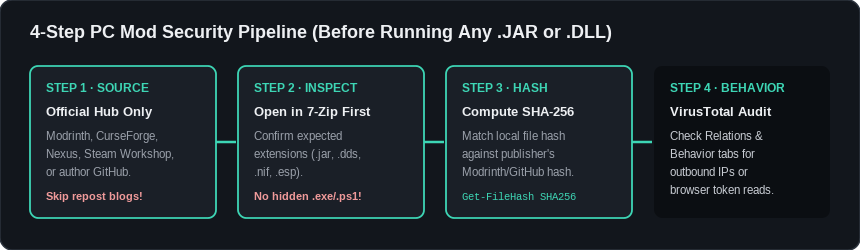
Step 1: Inspect Inside the Archive Before Extracting (7-Zip Rule)
Never double-click a downloaded .zip, .7z, or .rar blindly. Right-click → 7-Zip → Open archive and verify every single file extension inside matches what the mod actually claims to be:
| What the Mod Claims to Be | Expected Safe File Types | Instant Red Flag (Delete Immediately) |
|---|---|---|
| Minecraft Java Mod | Single .jar file (contains .class, fabric.mod.json / neoforge.mods.toml, assets/) |
.exe, .msi, .bat, .ps1, .vbs, or password-protected .zip |
| Minecraft Resource / Shader Pack | .zip holding pack.mcmeta, .png, .json, .fsh, .vsh |
Any .jar, .exe, .cmd, or .lnk shortcut hidden inside |
| Skyrim Texture / Mesh / Quest Mod | .dds, .nif, .esp, .esm, .esl, .bsa, .pex, .fuz |
Any .exe installer or unexpected .dll when not an SKSE plugin |
| Skyrim SKSE Plugin | SKSE/Plugins/*.dll, .toml, .ini, .pdb |
PowerShell scripts, external downloaders, or obfuscated launchers |
(Pro tip: Turn on File name extensions inside Windows File Explorer (View → Show → File name extensions) so an attacker cannot trick you with a double-extension file like ShadersPack.zip.exe.)
Step 2: Compute and Match the SHA-256 Hash Locally
Every file hosted on Modrinth (under the file’s metadata panel) and most open-source GitHub Releases publishes a cryptographic checksum. Compute your downloaded file’s exact SHA-256 hash locally in two seconds without running it:
# Windows PowerShell
Get-FileHash -Algorithm SHA256 .\downloaded-mod-file.jar
# macOS / Linux / Steam Deck
shasum -a 256 downloaded-mod-file.jar- If the hash matches the official Modrinth or GitHub release hash character-for-character, you know the binary was not tampered with in transit.
- Paste that SHA-256 string directly into VirusTotal’s Search tab—if the file has already been scanned, you see the full report instantly without even uploading it.
Step 3: Read VirusTotal Beyond the Raw Score
VirusTotal tests binaries across 70+ antivirus engines. New modders often misread the score in both directions—either panicking over a single harmless heuristic on SKSE64, or blindly trusting a brand-new malicious .jar that hasn’t been flagged yet.
Use this three-tier interpretation guide:
Tier A: Likely Safe False Positive (1/72 – 2/72 Obscure Heuristics)
- Looks like:
Generic.Heuristic,AI.Score, orUnsafefrom 1–2 minor engines while Microsoft Defender, Bitdefender, Kaspersky, ESET, and CrowdStrike all show Clean. - Why it happens: Legitimate script extenders (
SKSE64,MO2 USVFS,Engine Fixes) inject unsigned DLLs into game processes—behavior that looks similar to malware injection heuristics. - Verify: Confirm the download came straight from an established official page with thousands of downloads, public source code, and active community comments.
Tier B: Definite Threat (Delete Immediately — Do Not Run)
- Looks like:
5+detections across major engines OR any detection labeledStealer,RedLine,Lumma,Fractureiser,InfoStealer,TrojanDownloader, orObfuscated.Java. - Action: Delete the file immediately and never disable Windows Defender to bypass a warning from an unfamiliar source.
Tier C: Check the Behavior and Relations Tabs (Pro Move)
Click the Behavior and Relations tabs on VirusTotal—this catches stealth threats even when static detection counts are low:
- A single-player Skyrim mod or client-side Minecraft optimization mod has zero legitimate reason to contact raw unknown IP addresses, read
Chrome/User Data/Default/Login Data, inspect DiscordLocal Storage/leveldb, or spawn hiddenpowershell.exe -EncodedCommandprocesses. - If you see outbound C2 domains or browser credential-store access in the Behavior tab, treat it as confirmed malware immediately.
Step 4: Follow the Zero-Exception Sourcing Rule
Security tools are your seatbelt, not a reason to drive into traffic:
- Pull Minecraft mods directly through Prism Launcher or the Modrinth App (verified APIs + automatic hashes).
- Pull Skyrim and PC mods directly from Nexus Mods (built-in VirusTotal scan badges), Steam Workshop, or official GitHub Releases.
- Never run a
"Modpack_Installer.exe"sent over Discord DMs, TikTok comments, or shortened YouTube links—legitimate modpacks distribute lightweight.mrpack/ Wabbajack manifests that fetch verified files directly from official repositories.
Official download sources
We never re-host mod files. Download only from the creators' official pages:
Frequently Asked Questions
Why did Windows Defender flag an official SKSE64, MO2, or BepInEx DLL?
Script extenders and virtual file systems inject DLLs into running game processes—a low-level technique that triggers generic heuristic flags on unsigned community builds. Always confirm the download came from the official Silverlock/GitHub/Nexus page and verify its SHA-256 hash before allowing an exclusion.
Can a texture pack or shader .zip contain a virus?
Plain image files (.png, .dds) and GLSL shader text files cannot execute OS commands by themselves. The threat comes from deceptive archives that disguise an .exe, .scr, .bat, .lnk, or hidden .jar inside a download pretending to be a texture or shader pack.
Is a 0/72 VirusTotal score a 100% guarantee that a brand-new random mod is safe?
No. Brand-new obfuscated malware (especially custom Java .jar info-stealers) can briefly evade static antivirus signatures until analyzed. That is why checking the source repository, author history, and VirusTotal's Behavior/Relations tabs matters just as much as the raw detection count.